Autoloot picks your loot up the moment the monster dies. You say which items you want and
where they go; everything else stays in the corpse as usual. Open it from the Autoloot
button on the side panel, or type !autoloot in the chat.
Setting up your first rule
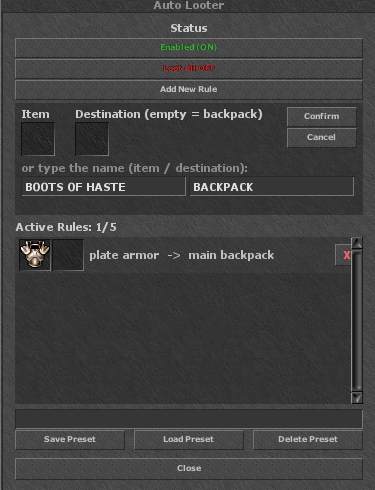
Where the item goes
The destination is a kind of container, not one specific bag. Set the rule gold coin → blue backpack and the gold goes into the first blue backpack you are carrying. Swap that bag for another of the same kind and the rule keeps working.
If you are not carrying the container at that moment, the item is neither lost nor left behind: it goes to your main backpack, and a line in the channel tells you the destination was not found. Autoloot never throws anything away.
Gold gets no special treatment. Gold, platinum and crystal coins go through the normal
rules like any other item. Without a rule for them — or without Loot All enabled — the coins stay
in the corpse.
Loot All
With Loot All enabled, Autoloot takes everything that drops, ignoring your rule list. The rules still decide the destination: whatever has a rule goes to its container, everything else goes to the main backpack.
Use it when you are clearing an area and do not want to pick, or on weak monsters where sorting is not worth it. On a long hunt, rules usually pay better: you come back with a backpack full of what matters instead of full of everything.
How many rules you get
Every character starts with 5 rules. In the Task Shop, the +5 autoloot slots offer costs 40 task points, is permanent, and can be bought more than once, up to a cap of 50 rules.
The counter in the window — Active Rules: 2/5 — already shows your current cap, including everything you bought.
Presets
A preset stores your whole rule set under a name. You can keep up to 10. They exist so you can switch hunts without setting everything up again: one preset for dragons, one for whatever drops feathers and gold, one for when you only want supplies.
Load Preset replaces your current rules with the preset's — it does not merge them. Delete Preset removes the stored preset, not your active rules.
In a party, loot belongs to the leader
While you are in a party, everything Autoloot collects goes to the leader, and the leader's rules are the ones that apply — not those of whoever landed the killing blow.
The reason is practical: the item has to land in a container that actually exists. Using the killer's rules would point at bags the leader may not even carry, and everything would end up in their main backpack anyway. Whoever leads the party is who configures the party's Autoloot.
Commands
Everything the window does has a command too, if you prefer the keyboard. Both ! and / work.
| Command | What it does |
|---|---|
| !autoloot | Shows the help with every command. |
| !autoloot on / off | Enables and disables the system. |
| !autoloot lootall | Toggles Loot All. |
| !autoloot add <item> [container] | Creates the rule. With no container, it goes to the main backpack. |
| !autoloot remove <item> | Removes that item's rule. |
| !autoloot list | Lists your rules and the state of both switches. |
| !autoloot clear | Deletes every rule at once. |
Details worth knowing
Only your own corpses. Autoloot acts on loot that is yours. A corpse someone else
killed still belongs to them, and your Autoloot will not touch it.
What is inside the bag comes too. On this server, shields, wands, distance weapons and anything with charges or a duration do not drop loose in the corpse — they arrive inside a bag. Autoloot looks in there as well, so those items are collected normally. The bag itself is never taken: it is packaging, not loot.
You can see what was collected. Every kill that yields something prints “Autoloot: picked up N item(s)” in your channel. If a destination could not be found, that same line says so — so you catch the broken rule right away instead of three hours later.
A full backpack stops it. With no room left, the item stays in the corpse. Worth checking your capacity before a long hunt, especially with Loot All enabled.